
This is an old revision of the document!
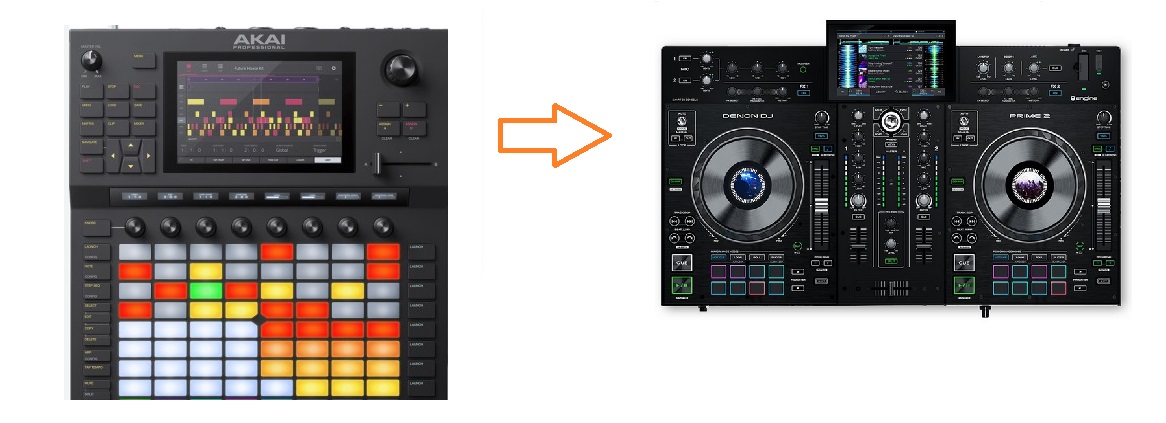
I think the best / easier usage with force is to use prime2 or primeGo. Below i will explain / provide a template for Prime2.
Prime use QML from QT to do assignments and map functions. You can write your own javascript / qml code to suit your needs. I'm not a QT expert, i'm still learning :p
Import section to get all the QT/QML prime objects
import airAssignments 1.0
import ControlSurfaceModules 0.1
import InputAssignment 0.1
import OutputAssignment 0.1
import Planck 1.0
import QtQuick 2.12
Then Assignments begin
MidiAssignment {
	objectName: 'PRIME 2 Controller Assignment'

	Utility {
		id: util
	}

	GlobalAssignmentConfig {
		id: globalConfig
		midiChannel: 0
	}

	GlobalAction {
		id: globalAction
	}

	Back {
		note: 67
		ledType: LedType.Simple
	}

	Forward {
		//note: 115
		shiftAction: Action.Quantize
		ledType: LedType.Simple
	}

	BrowseEncoder {
		pushNote: 111
		turnCC: 100
		ledType: LedType.Simple
	}

	View {
		note: 0
		holdAction: Action.ToggleControlCenter
		shiftAction: Action.SwitchMainViewLayout
		ledType: LedType.Simple
	}

	Shift {
		note: 49
		ledType: LedType.Simple
	}

	Media {
		mediaButtonsModel: ListModel {
			ListElement {
				name: 'Eject'
				shiftName: 'Source'
				note: 20
				hasLed: true
			}
		}
	}

	Mixer {
		cueMixCC: 12
		cueGainCC: 13
		crossfaderCC: 32
	}

	MicSettings {}

	Mics {
		mic1Note: 36
		mic2Note: 37
		mic1ShiftAction: Action.ToggleMicTalkover
	}
Then we create one repeater bloc for deck1 and further, another for deck2
DeckMidiChannel is 9 on the force when you press the sensitive pads in the middle.
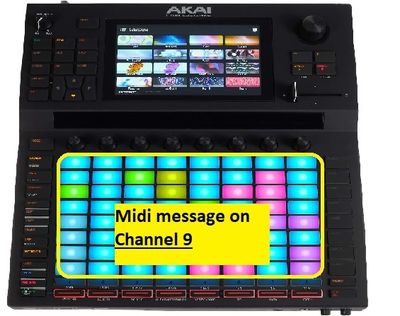
that's why i use deckMidiChannel: 9 , which will be assigned to my whole repeater bloc section
	Repeater {
		model: ListModel {
			ListElement {
				deckName: 'Left'
				deckMidiChannel: 9
				loadNote: 123
			}
		}

		Item {
			DeckAssignmentConfig {
				id: deckConfig
				name: model.deckName
				midiChannel: model.deckMidiChannel
			}

			DeckAction {
				id: deckAction
			}

			Bank {}

			Load {
				note: model.loadNote
				ledType: LedType.Simple
			}


			PerformanceModes {
				ledType: LedType.RGB
				modesModel: ListModel {
					ListElement {
						note: 78
						view: 'CUES'
					}
					ListElement {

						note: 79
						view: 'LOOPS'
						altView: 'AUTO'
					}
					ListElement {
						note: 80
						view: 'ROLL'
					}
					ListElement {
					note: 81
					view: "SLICER"
					altView: "FIXED"
				}

				}
			}
Here In PerformanceModes section , we define where we want the function pad assignment. I've done it on note 78,79,80,81 for deck 1
By using LedType.RGB option, I suspect Engine send a sendcolor function through the Device Assignement file . However this property is not assignable to each functions.
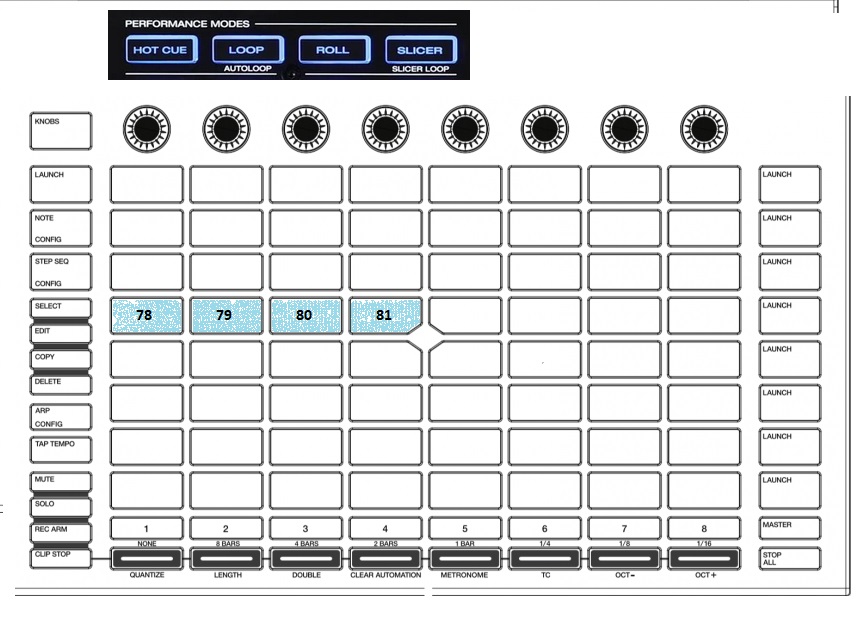
The we defined ActionPads , they are for the pads when you will press one of the pad upper :
- Press 78 you'll have CUES mode
- Press 79 you'll have LOOPS mode
- Press 80 you'll have AUTOLOOPS mode
- Press 81 you'll have SLICER mode
			ActionPads {
				firstPadNote: 70
				ledType: LedType.RGB
			}
As prime 2 has 8 pads, when putting 70, it will assign pads from 70 to 77 ( 70, 70+1 , 70+2 ,70+3, etc… to 70+7) (0 to 7 = 8 pads )
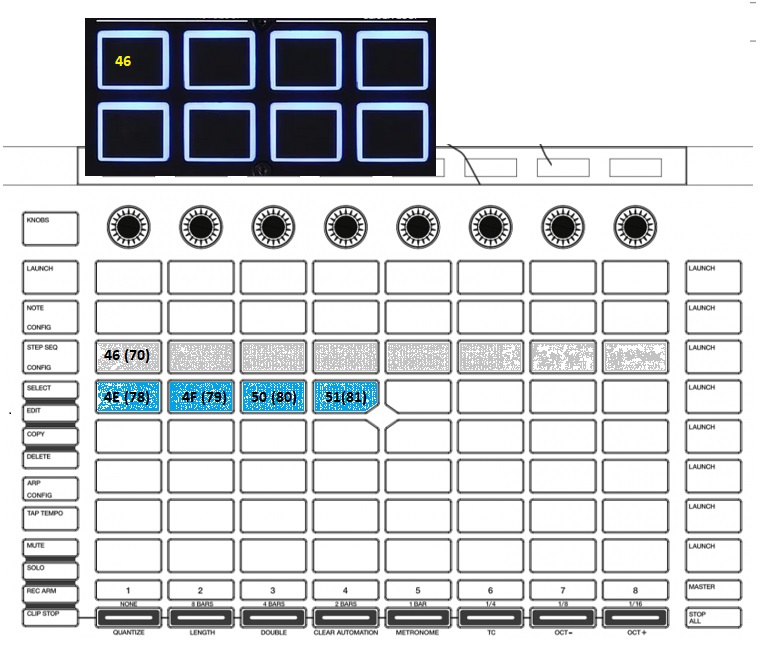
As an exemple, when you'll press the pad for the cue ( pad number 78 ) . it will send a Sysex message to the pad via sendcolor function, defined in the Device Assignment File. And then you'll have all the cue for this track
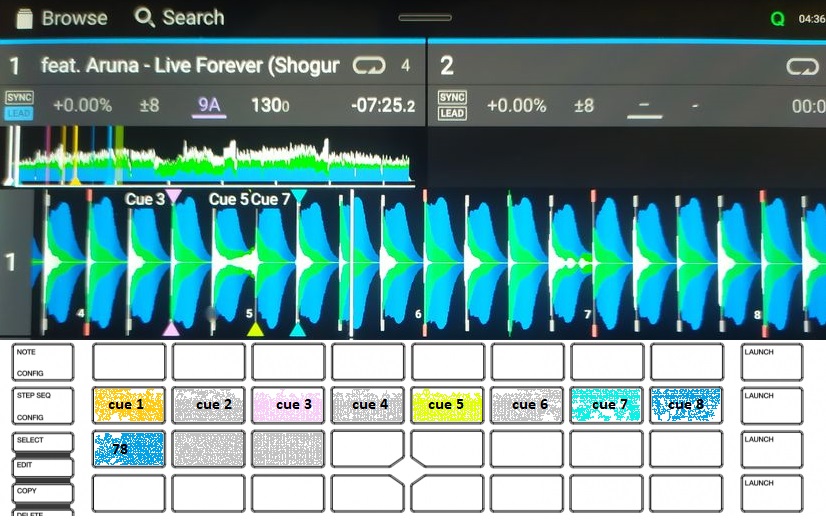
You can trigger you cue, by pushing the colored pad , create new on the no colored one or remove them by press shift of the AKF + your colored pad. Shift button has been mapped upper with Shift keyword ( see upper ) to note 49, which is the midi note that shift button send on AKF.
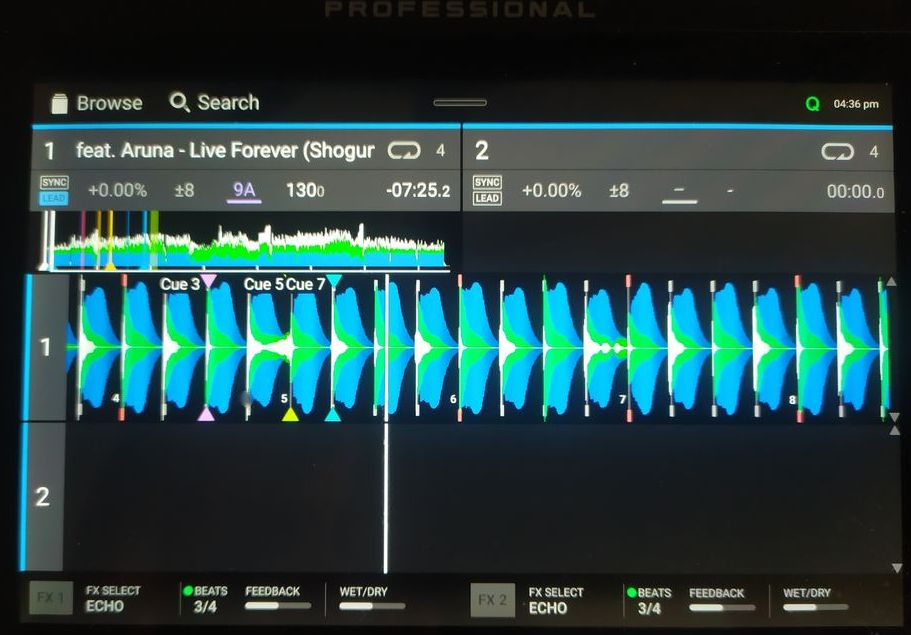
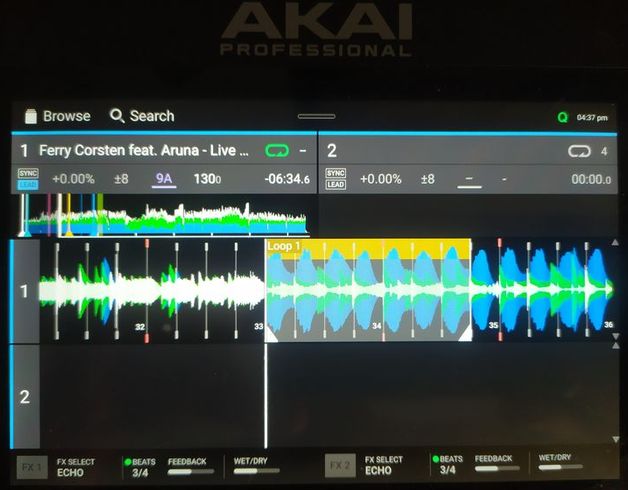
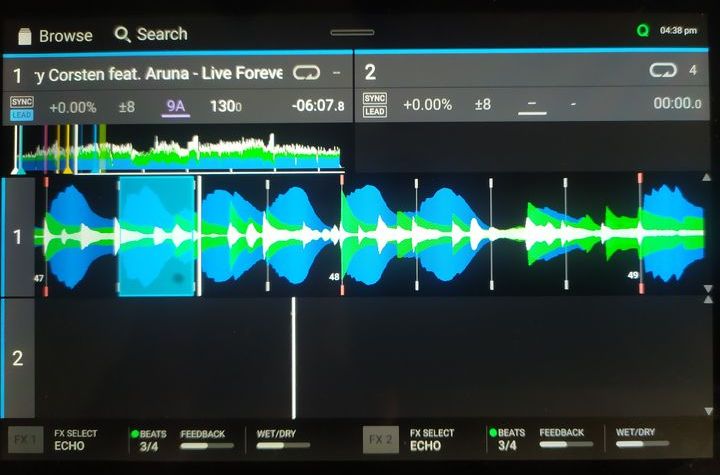
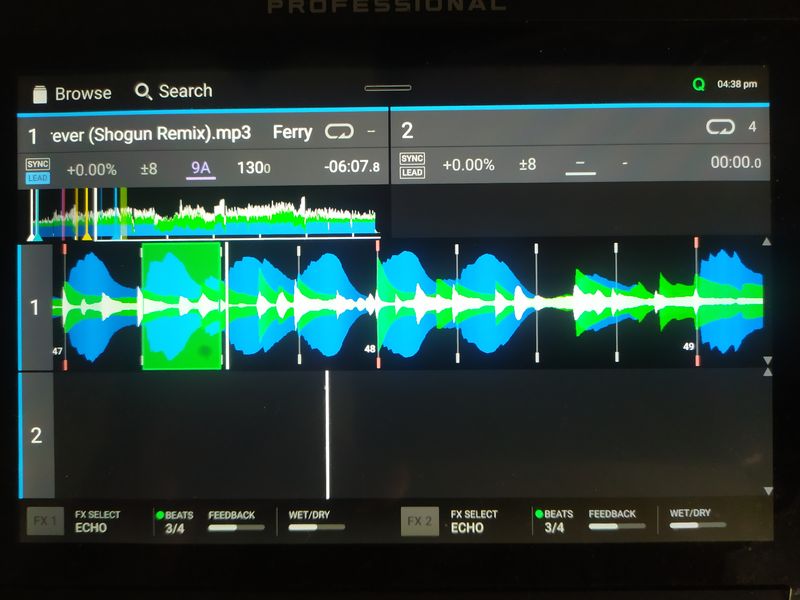
It will work the same for loops (press key 79 ) , quick auto loops (key 80) , and slicer (key 81 ) Below some pics of these functions.
Cues
 Loops
Loops
** Slicer
			Sync {
				syncNote: 83
				syncHoldAction: Action.KeySync
			}

			PlayCue {
				cueNote: 37
				cueShiftAction: Action.SetCuePoint
				playNote: 82

			}

			PitchBend {
				minusNote: 29
				plusNote: 30
			}

			JogWheel {
				touchNote: 33
				ccUpper: 0x37
				ccLower: 0x4D
				jogSensitivity: 1638.7 * 10.08
				hasTrackSearch: true
			}

			Vinyl {
				note: 35
				holdAction: Action.GridCueEdit
			}

			AutoLoop {
				pushNote: 116
				turnCC: 16
				loopInactiveShiftTurnAction: Action.BeatJump
				ledType: LedType.Simple
			}

			SpeedSlider {
				ccUpper: 0x1F
				ccLower: 0x4B
				invert: true
			}


		}
	}
Same thing for deck Right
Repeater {
		model: ListModel {
			ListElement {
				deckName: 'Right'
				deckMidiChannel: 9
				loadNote: 124
			}
		}

		Item {
			DeckAssignmentConfig {
				id: deckConfig
				name: model.deckName
				midiChannel: model.deckMidiChannel
			}

			DeckAction {
				id: deckAction
			}

			Bank {}

			Load {
				note: model.loadNote
				ledType: LedType.Simple
			}

			PerformanceModes {
				ledType: LedType.RGB
				modesModel: ListModel {
					ListElement {
						note: 110
						view: 'CUES'
					}
					ListElement {
						note: 111
						view: 'LOOPS'
						altView: 'AUTO'
					}
					ListElement {
						note: 112
						view: 'ROLL'
					}
					ListElement {
					note: 113
					view: "SLICER"
					altView: "FIXED"
				}
				}
			}

			ActionPads {
				firstPadNote: 102
				ledType: LedType.RGB
			}

			Sync {
				syncNote: 115
				syncHoldAction: Action.KeySync
			}

			PlayCue {
				cueNote: 9
				cueShiftAction: Action.SetCuePoint
				playNote: 114
			}

			PitchBend {
				minusNote: 29
				plusNote: 30
			}

			JogWheel {
				touchNote: 33
				ccUpper: 0x37
				ccLower: 0x4D
				jogSensitivity: 1638.7 * 10.08
				hasTrackSearch: true
			}

			Vinyl {
				note: 35
				holdAction: Action.GridCueEdit
			}

			AutoLoop {
				pushNote: 56
				turnCC: 23
				loopInactiveShiftTurnAction: Action.BeatJump
				ledType: LedType.Simple
			}

			SpeedSlider {
				ccUpper: 0x1F
				ccLower: 0x4B
				invert: true
			}
		}
	}
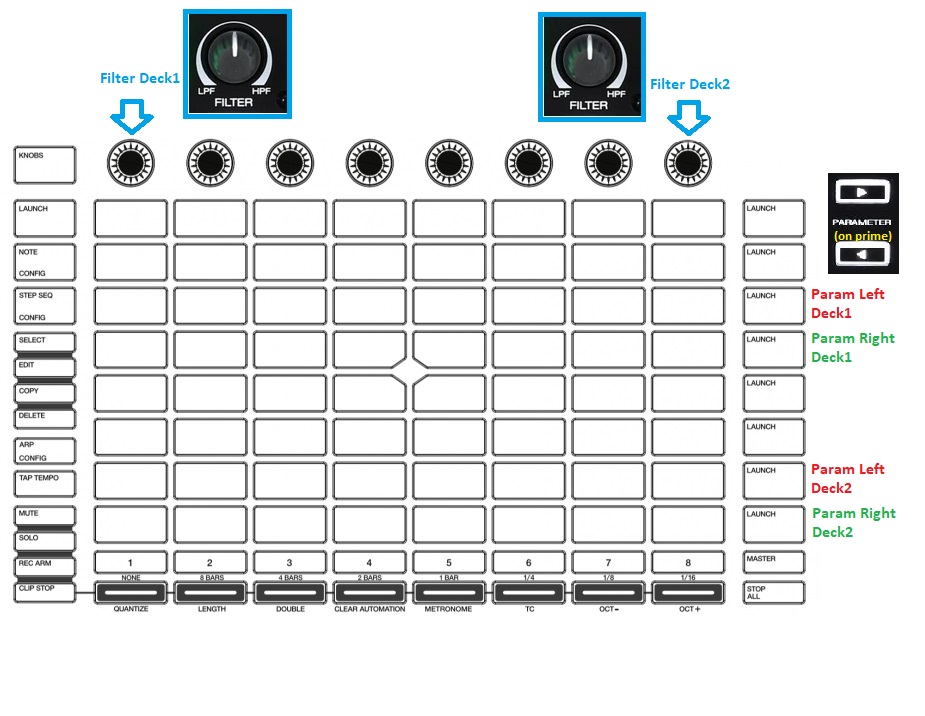
Next I configure Filter Sweep button for the 2 decks like below, and parameters button used to change note repeat speed in slice mode.
Repeater {
		model: ListModel {
			ListElement {
				deckName: "Left"
				deckMidiChannel: 0
			}

			ListElement {
				deckName: "Right"
				deckMidiChannel: 0
			}


		}

		Item {
			id: deckmixer

// Internal properties for Deck 1


			readonly property QObjProperty padsView1: Planck.getProperty("/Engine/Deck%1/Pads/View".arg(1))

			property string padsMode1: padsView1.translator.string

			readonly property bool padsModeIsAutoLoop1: padsMode1 === "AUTO"
			readonly property bool padsModeIsLoop1: padsMode1 === "LOOPS"
			readonly property bool padsModeIsLoopRoll1: padsMode1 === "ROLL"
			readonly property bool padsModeIsSlicerContinuous1: padsMode1 === "SLICER"
			readonly property bool padsModeIsSlicer1: padsModeIsSlicerContinuous1 || padsMode1 === "FIXED"

			readonly property bool loopEnabled1: Planck.getProperty("/Engine/Deck%1/Track/LoopEnableState".arg(1)).translator.state
			readonly property bool loopEditable1: Planck.getProperty("/Engine/Deck%1/Track/LoopEnableState".arg(1)).translator.editable


// Internal properties for Deck 2


			readonly property QObjProperty padsView2: Planck.getProperty("/Engine/Deck%1/Pads/View".arg(2))

			property string padsMode2: padsView2.translator.string

			readonly property bool padsModeIsAutoLoop2: padsMode2 === "AUTO"
			readonly property bool padsModeIsLoop2: padsMode2 === "LOOPS"
			readonly property bool padsModeIsLoopRoll2: padsMode2 === "ROLL"
			readonly property bool padsModeIsSlicerContinuous2: padsMode2 === "SLICER"
			readonly property bool padsModeIsSlicer2: padsModeIsSlicerContinuous2 || padsMode2 === "FIXED"

			readonly property bool loopEnabled2: Planck.getProperty("/Engine/Deck%1/Track/LoopEnableState".arg(2)).translator.state
			readonly property bool loopEditable2: Planck.getProperty("/Engine/Deck%1/Track/LoopEnableState".arg(2)).translator.editable


// Sweep Filter for Deck 1

ValueCCAssignment {
				objectName: "Dual Filter Cutoff Deck%1".arg(1)
				cc: 16
				channel: deckMidiChannel

						output: JogOutput {
							jogAcceleration: 1.5;
							jogSensitivity: 0.5;
							type: 0
							target: PropertyTarget { path: "/Engine/Mixer/Channel%1/SweepFx/Value".arg(1) }
						}

			}


// Sweep Filter for deck 2

ValueCCAssignment {
				objectName: "Dual Filter Cutoff Deck%1".arg(2)
				cc: 23
				channel: deckMidiChannel


						output: JogOutput {
							jogAcceleration: 1.5;
							jogSensitivity: 0.5;
							type: 0
							target: PropertyTarget { path: "/Engine/Mixer/Channel%1/SweepFx/Value".arg(2) }


						}

			}
Then we will map FX section / Buttons.
     ///////////////////////////////////////////////////////////////////////////
	// Effect Controls
	 Repeater {
		model: ListModel {
			ListElement {
				deckName: "Left"
				deckMidiChannel: 0
			}

			ListElement {
				deckName: "Right"
				deckMidiChannel: 1
			}
		}

		Item {
			id: deckFx

			ValueNoteAssignment {
				objectName: "FX%1 Active Button".arg(1)
				note: 93
				channel: deckMidiChannel
				enabled: !device.shift
				output: ActionOutput {
					target: PropertyTarget {
						path: "/Engine/Mixer/Channel%1/DJFx/Active".arg(1)
					}
				}
			}

			ValueNoteAssignment {
				objectName: "FX%1 Active Button".arg(2)
				note: 05
				channel: deckMidiChannel
				enabled: !device.shift
				output: ActionOutput {
					target: PropertyTarget {
						path: "/Engine/Mixer/Channel%1/DJFx/Active".arg(2)
					}
				}
			}


				ValueCCAssignment {
				objectName: "FX%1 Selection".arg(1)
				cc: 17
				channel: deckMidiChannel

				enabled: Planck.getProperty("/Engine/Mixer/Channel%1/DJFx/Selecting".arg(1)).translator.state
				output: QtObject {
					readonly property QObjProperty pSelectionIndex: Planck.getProperty("/Engine/Mixer/Channel%1/DJFx/PreselectIndex".arg(1))
					function setValue(channel, value, assignmentEnabled) {
						if(assignmentEnabled) {
							if(value > 0.5) { // turn counter clockwise, value normalized
								pSelectionIndex.translator.unnormalized = pSelectionIndex.translator.unnormalized - 1
							}
							else {
								pSelectionIndex.translator.unnormalized = pSelectionIndex.translator.unnormalized + 1
							}
						}
					}
				}
			}


			ValueCCAssignment {
				objectName: "FX%1 Selecting".arg(1)
				cc: 17
				channel: deckMidiChannel
				enabled: !Planck.getProperty("/Engine/Mixer/Channel%1/DJFx/Selecting".arg(1)).translator.state
				output: ActionOutput {
					behaviour: force.action
					target: PropertyTarget {
						path: "/Engine/Mixer/Channel%1/DJFx/Selecting".arg(1)
					}
				}
			}

			ValueCCAssignment {
				objectName: "FX%1 Selection".arg(2)
				cc: 20
				channel: deckMidiChannel

				enabled: Planck.getProperty("/Engine/Mixer/Channel%1/DJFx/Selecting".arg(2)).translator.state
				output: QtObject {
					readonly property QObjProperty pSelectionIndex: Planck.getProperty("/Engine/Mixer/Channel%1/DJFx/PreselectIndex".arg(2))
					function setValue(channel, value, assignmentEnabled) {
						if(assignmentEnabled) {
							if(value > 0.5) { // turn counter clockwise, value normalized
								pSelectionIndex.translator.unnormalized = pSelectionIndex.translator.unnormalized - 1
							}
							else {
								pSelectionIndex.translator.unnormalized = pSelectionIndex.translator.unnormalized + 1
							}
						}
					}
				}
			}


			ValueCCAssignment {
				objectName: "FX%1 Selecting".arg(2)
				cc: 20
				channel: deckMidiChannel
				enabled: !Planck.getProperty("/Engine/Mixer/Channel%1/DJFx/Selecting".arg(2)).translator.state
				output: ActionOutput {
					behaviour: force.action
					target: PropertyTarget {
						path: "/Engine/Mixer/Channel%1/DJFx/Selecting".arg(2)
					}
				}
			}


//			ValueCCAssignment {
//				objectName: "FX%1 Rate".arg(1)
//				cc: 100
//				channel: deckMidiChannel
//				enabled: Planck.getProperty("/Engine/Mixer/Channel%1/DJFx/Knob2Target".arg(1)).translator.string === "Rate"
//				output: QtObject {
//					readonly property QObjProperty pTarget: Planck.getProperty("/Engine/Mixer/Channel%1/DJFx/Rate".arg(1))
//					function setValue(channel, value, assignmentEnabled) {
//						if(assignmentEnabled) {
//							var counterClock = value > 0.5
//							var changeIndex = counterClock ? -1 : 1
//							pTarget.translator.index = pTarget.translator.index + changeIndex
//						}
//					}
//				}
//			}

			ValueCCAssignment {
				objectName: "FX%1 Amount".arg(1)
				cc: 18
				channel: deckMidiChannel
				enabled: Planck.getProperty("/Engine/Mixer/Channel%1/DJFx/Knob2Target".arg(1)).translator.string === "Amount"
				output: EndlessKnobOutput {
					smallestIncrement: 0.01
					biggestIncrement: 0.1
					target: PropertyTarget { path: "/Engine/Mixer/Channel%1/DJFx/Amount".arg(1) }
				}
			}

			ValueCCAssignment {
				objectName: "FX%1 Amount".arg(2)
				cc: 21
				channel: deckMidiChannel
				enabled: Planck.getProperty("/Engine/Mixer/Channel%1/DJFx/Knob2Target".arg(2)).translator.string === "Amount"
				output: EndlessKnobOutput {
					smallestIncrement: 0.01
					biggestIncrement: 0.1
					target: PropertyTarget { path: "/Engine/Mixer/Channel%1/DJFx/Amount".arg(2) }
				}
			}


			ValueCCAssignment {
				objectName: "FX%1 Mix".arg(1)
				cc: 19
				channel: deckMidiChannel
				output: ValueOutput {
					target: PropertyTarget {
						path: "/Engine/Mixer/Channel%1/DJFx/Mix".arg(1)
					}
				}
			}


			ValueCCAssignment {
				objectName: "FX%1 Mix".arg(2)
				cc: 22
				channel: deckMidiChannel
				output: ValueOutput {
					target: PropertyTarget {
						path: "/Engine/Mixer/Channel%1/DJFx/Mix".arg(2)
					}
				}
			}


		}
	}


/*
	FxAssignmentConfig {
		id: fxConfig
		midiChannel: 0
		channelNames: ['1', '2']
	}

	DJFxSelect {
		pushNote: 53
		touchNote: 91
		turnCC: 17
	}

	DJFxTime {
		pushNote: 8
		turnCC: 18
	}

	DJFxWetDry {
		cc: 19
	}

	DJFxActivate {
		fxActivateType: FxActivateType.Button
		activateControlsModel: ListModel {
			ListElement {
				midiChannel: 0
				note: 93

			}
			ListElement {
				midiChannel: 0
				note: 92
			}


		}
	}


	DJFxAssign {

		notes: [94, 95]
	}

*/
}